Exploring Epic integration: architecture, real-world insights, and a concrete example of automated post-discharge follow-up.

For health systems running Epic, adopting new clinical technology rarely fails because the solution doesn’t work.
It fails because it doesn’t integrate cleanly into existing workflows.
Even highly advanced tools can create friction if they require clinicians to switch systems, duplicate documentation, or adapt to new processes. That’s why the key question when evaluating clinical AI isn’t just “does it work?”.
It’s: “Does it work inside Epic, without disrupting how care is delivered today?”
This post explains how Tucuvi integrates with Epic to enable fully automated patient follow-up workflows, using a real example: post-discharge follow-up.
How Tucuvi Integrates with Epic
Tucuvi Voice AI platform is designed to operate entirely within the Epic ecosystem, without requiring changes to clinician workflows.
The integration is built around two independent Epic applications, each serving a distinct role:
- A backend automation engine that runs workflows autonomously
- An embedded clinical interface accessible directly inside Epic
Together, they allow patient interactions to happen automatically while keeping clinicians fully in control within their existing environment.
Two independently registered Epic applications
LOLA Backend: Autonomous Workflow Engine
LOLA Backend is the integration engine.
It operates as a server-to-server service that:
- Receives clinical events from Epic in real time
- Retrieves patient context via FHIR APIs
- Initiates patient calls automatically
- Writes structured clinical notes back into the EHR
This system runs fully autonomously, without requiring any clinician action.
A health system can deploy LOLA Backend alone and immediately enable end-to-end automated workflows with full documentation inside Epic.
Tucuvi Dashboard: Embedded SMART on FHIR Interface
The Tucuvi Dashboard is the clinical interface.
It is embedded directly inside Hyperspace as a SMART on FHIR application, meaning:
- Clinicians access it using their existing Epic credentials
- The patient context is already loaded
- No additional login or system switching is required
From within Epic, care teams can:
- View enrolled patients
- Review call outcomes
- Triage escalated cases flagged by LOLA
This creates a single, unified workspace for managing patient follow-up.
The 3 Core Integration Layers (HL7, FHIR, SMART on FHIR)
The integration is built on three standard protocols widely used across healthcare systems.
1. HL7v2 Event Triggers (Real-Time Clinical Events)
When key clinical events occur in Epic, such as discharges, admissions, or scheduling changes, they generate HL7v2 messages (e.g., ADT, SIU).
LOLA Backend receives these events in real time via Epic’s Interface Engine.
Each event is parsed in real time and triggers the appropriate workflow.
2. FHIR R4 APIs (Patient Context + Write-Back)
Before interacting with a patient, LOLA retrieves clinical data from Epic using FHIR R4 APIs, including:
- Diagnoses
- Procedures
- Active medications
This ensures every interaction is grounded in the patient’s actual clinical context.
After the interaction, LOLA writes results back into Epic as a structured clinical note, directly to the patient's chart under the relevant encounter.
3. SMART on FHIR (Embedded Clinician Experience)
The clinician-facing experience is delivered through a SMART on FHIR application embedded in Epic.
When LOLA identifies a case requiring attention:
- The alert appears directly inside Epic
- The patient context and call summary are already available
- Clinicians can take action immediately
There is no need to switch systems or re-enter data .No separate login, no switching between systems.
A real-world example: Automated post-discharge follow-up in Epic
Post-discharge follow-up is an example of a clinical workflow running on this integration.
Here is what the full loop looks like.
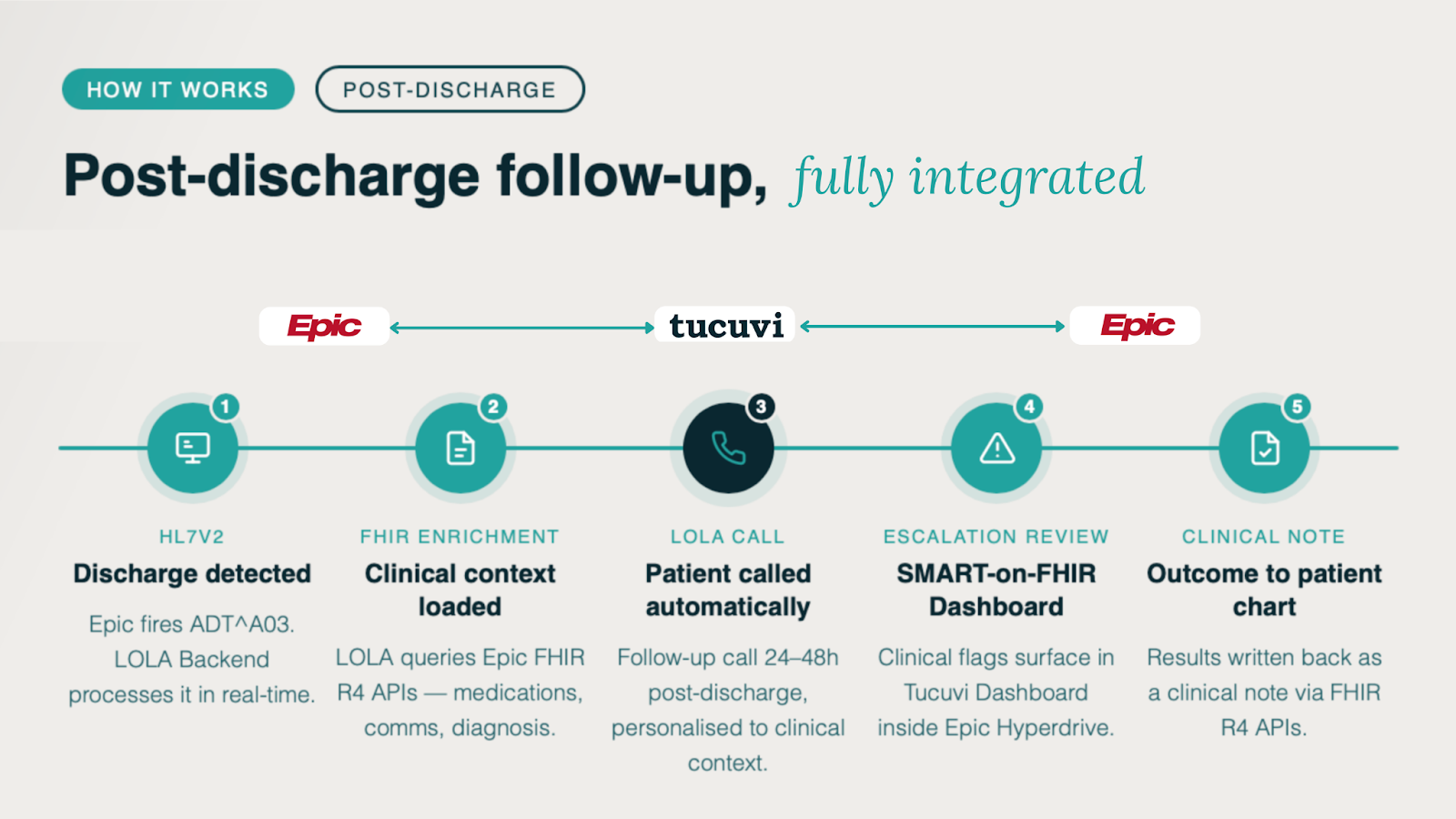
Step 1: Discharge Event Triggers the Workflow
A patient is discharged.
Epic generates an ADT^A03 message, which is sent to LOLA Backend in real time.
Step 2: AI Builds Patient Context from Epic
LOLA queries Epic’s FHIR API to retrieve:
- Encounter details
- Diagnoses
- Procedures performed
- Medications at discharge
This context determines:
- Which questions are asked
- How the conversation is framed
- What conditions trigger escalation
Step 3: Patient Call and Clinical Assessment
Within 24-48 hours, LOLA calls the patient.
The call follows a structured clinical protocol, including:
- Symptom checks
- Wound status (if applicable)
- Medication adherence
- Patient concerns
LOLA verifies patient identity before any clinical interaction.
If the patient speaks a different language, LOLA adapts or flags the case.
Step 4: Escalations Surface Inside Epic
If the call identifies a risk (e.g., concerning symptoms or patient distress):
- The case is flagged immediately
- The alert appears in the Tucuvi Dashboard inside Epic
- Clinicians can review the call summary and patient context
All of this happens without leaving the EHR.
Step 5: Structured Clinical Note Written Back to Epic
Once the call is complete:
- LOLA generates a structured clinical note
- The note is written back into Epic as a FHIR DocumentReference
- It is linked to the original discharge encounter
The result:
Every patient interaction becomes documented, structured, and actionable clinical data within the existing record.

Beyond post-discharge follow-up
Post-discharge follow-up illustrates the architecture, but the same foundation extends to other clinical workflows without a new integration project.
Examples include:
- Post-surgical follow-up, tailored by procedure type
- Transitions of care, including medication-aware discharge calls
- Care gap outreach, for preventive or chronic care
- High-risk patient monitoring, including medication adherence
On the Epic side, these workflows align naturally with modules such as:
- Cadence for scheduling modules
- Compass Rose for population health
- Willow for pharmacy workflows
- Cheers for specific campaigns
All workflows run on the same integration foundation.
Epic, Hyperspace, Cadence, Willow, Compass Rose, and Cheers are registered trademarks of Epic Systems Corporation.
What This Means for Health Systems Using Epic
This integration model enables Voice AI to operate inside existing systems without adding complexity.
It allows health systems to:
- Automate patient follow-up without increasing clinician workload
- Maintain full visibility and control within Epic
- Avoid additional logins or external tools
- Scale new workflows without new integration projects
In practice, this means new capabilities can be introduced without disrupting how care teams already work.
Evaluating How This Would Work in Your Epic Environment
Every health system’s configuration is different.
If you’re evaluating how automated patient follow-up could work within your Epic environment, we can walk through the integration and workflow with your team.
